
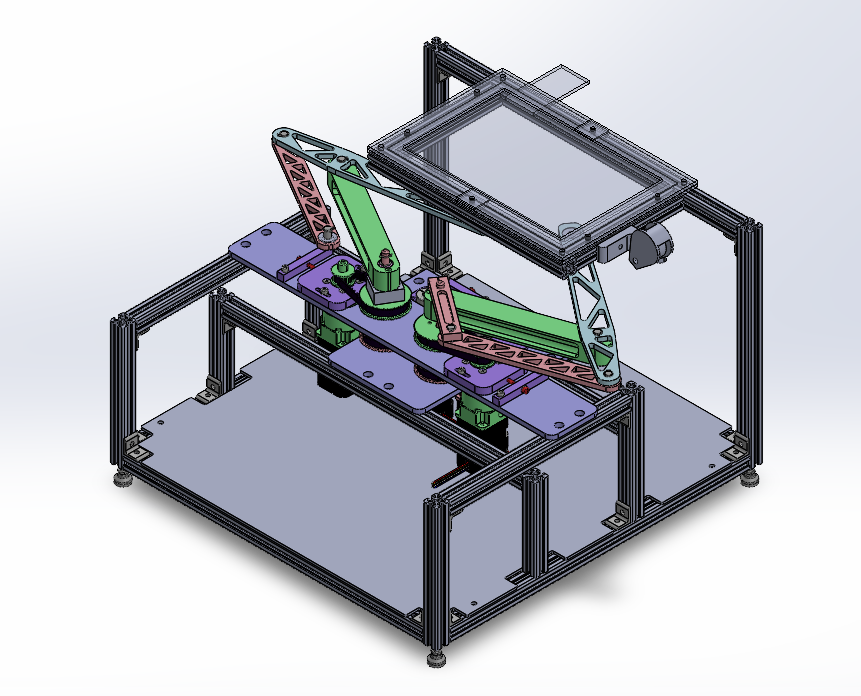
In my senior year of college, I worked with a team to complete a novel haptic robotic device under Professor Ed Colgate.
Introduction
What is a haptic device?
A haptic device machine that can simulate virtual objects with which a user may interact primarily via the sense of touch
Some examples are:
- iPhone- keyboard clicks
- 6DOF robotics arm with force-sensing hand and active glove
Our Challenge
Create an interactive 2D display (touchscreen) with active force feedback that can apply up to 6N of force on the user
How it works

- Two, 2R parallel linkages
- Magnets on the end effector go under the the screen and interact with magnets on top of the screen that users interact with
- Uses tablet finger position data to get the user magnet position
Demos
Demo 1: “Feeling” a Function
In this demo, the user would put one finger on each magnet. As they slide the magnet along the straight line, their other finger will be forced to follow the curved line. If they try to move their finger off of the curved line they will feel a force pushing them back onto it.
Demo 2: Virtual Knob
In this demo, users could put two fingers onto the knob on the screen. As they simulated the movement of turning it, the robot makes it so that the user feels the knob “click” into place at each tick mark, as if it were a physical knob with mechanical grooves.
Demo 3: “Feeling” a shape
In this demo, users would put one finger on the knob and the other on the shape. Similar to the first demo, as they turn the knob, their finger will get pulled around the shape. We envisioned that this technology might be used to teach blind children different shapes.